
Download IconChanger – Icon Changer, Desktop Customization, File Icon, Folder Icon, System Icon
Overview
IconChanger is a mobile utility designed to enhance user personalization by enabling the replacement of default icons for files, folders, and system options on Android devices. The app provides a straightforward solution for users seeking to customize their device’s visual interface, transforming standard system icons into more appealing or meaningful representations. This functionality appeals to users who value aesthetic control and wish to create a unique digital environment tailored to their preferences.
By allowing changes to both file and system-level icons, IconChanger addresses the common desire for a more personalized and visually engaging user experience. The app is particularly beneficial for users who spend significant time navigating their device’s file system or managing digital content, as it offers a simple way to improve visual clarity and organization. It also supports users who enjoy tinkering with their device’s interface and appreciate tools that offer granular control over appearance.
Although the developer did not provide additional background information, the app has been available since 2009, indicating a long-standing presence in the Android ecosystem. Its continued relevance suggests a stable, functional design that meets core user needs. The app’s purpose is not limited to aesthetic enhancement—it also contributes to usability by enabling users to assign intuitive icons to frequently used items, improving navigation efficiency.
IconChanger operates within the broader category of Android utility tools, filling a niche for users who seek deeper interface customization beyond what standard system settings offer. Its ability to scan system folders and present a comprehensive list of available icons makes it a practical choice for those aiming to refine their device’s appearance with minimal effort.
Key Features & Functionality
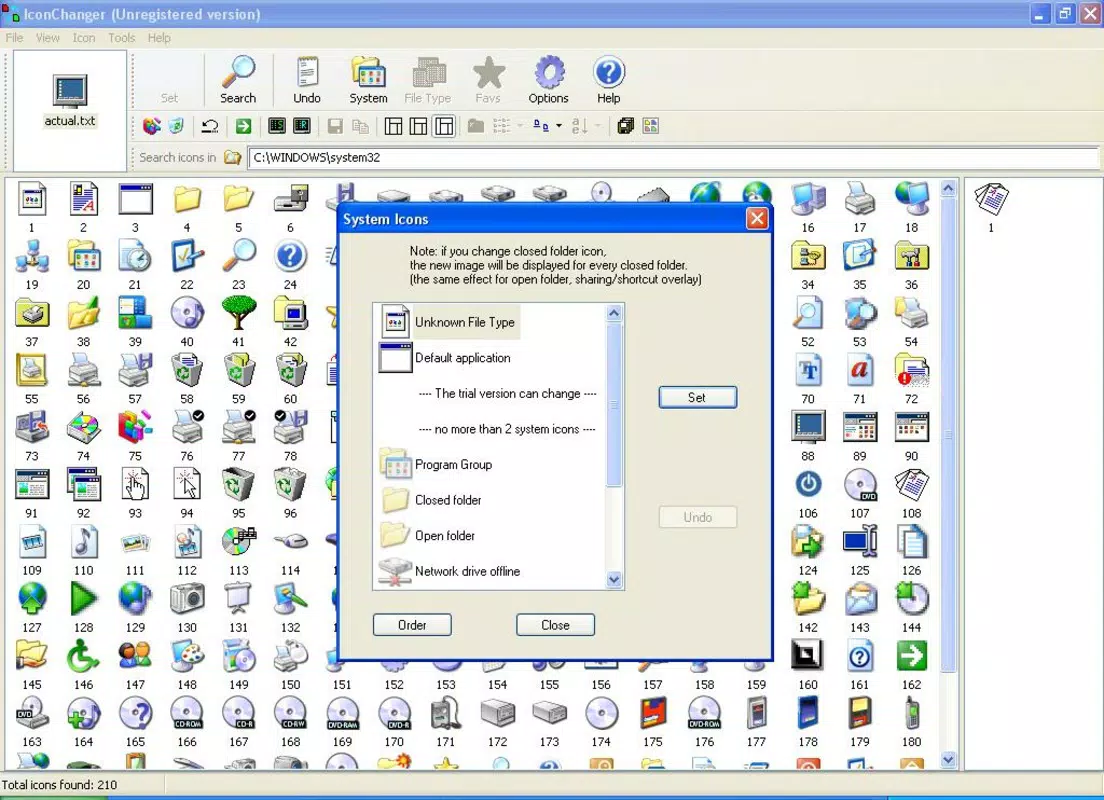
- Comprehensive Icon Search: IconChanger scans all system folders to generate a detailed list of available icons, ensuring users can access a wide range of visual elements even if they are not immediately visible in standard directories.
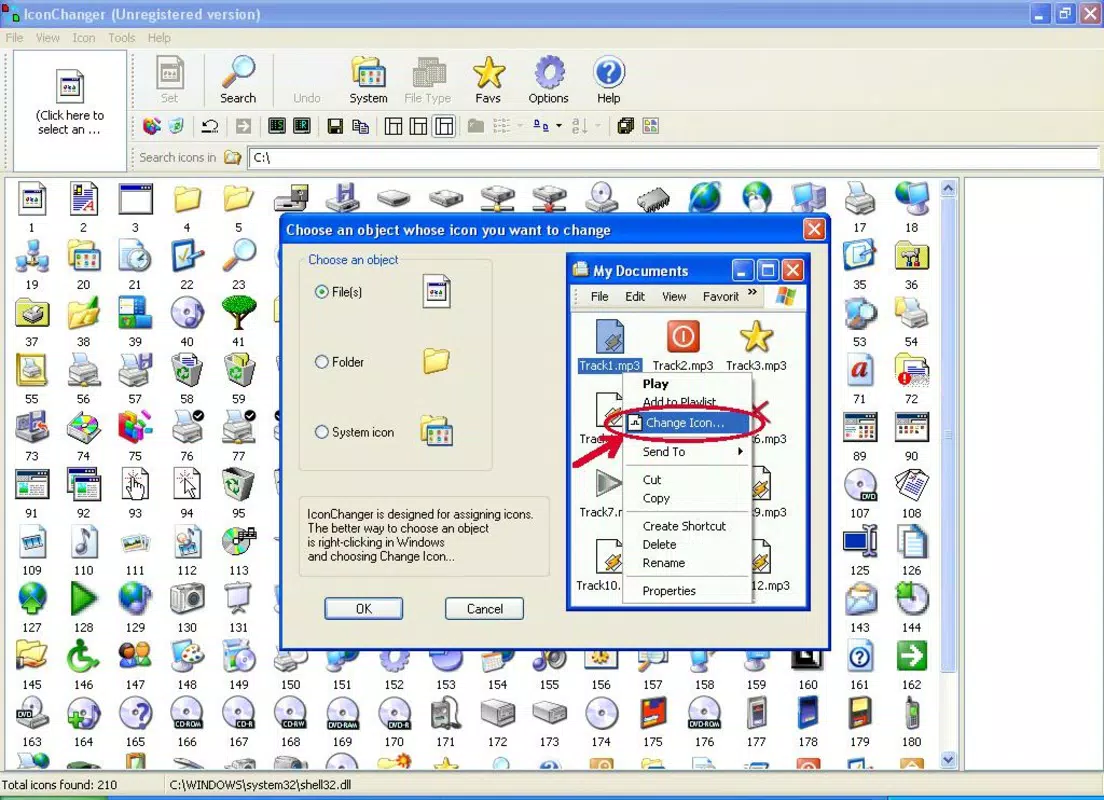
- User-Friendly Interface: The app features a straightforward layout that simplifies the process of selecting and applying new icons, allowing users to make changes with a single click—ideal for both beginners and experienced users.
- Frequent Icons Toolbar: A dedicated toolbar enables users to save and quickly access their most-used icons, streamlining the customization workflow and reducing repetitive navigation.
- Flexible Search Options: Users can adjust the search folder for icons, allowing them to explore custom or third-party icon locations beyond default system paths.
- Custom Icon Customization: The app supports changing icons for files, folders, and system options such as the Control Panel or desktop settings, offering a high degree of personalization across the device interface.
For example, a user managing multiple project folders might assign distinct icons to each for faster visual identification. Similarly, someone who frequently accesses the device settings could replace the default gear icon with a more meaningful symbol. These practical applications demonstrate how IconChanger enhances both functionality and aesthetics in everyday use.
Interface, UX & Performance
IconChanger presents a clean, minimal interface focused on usability and direct access to core functions. The layout emphasizes clarity, with icon lists displayed in a scrollable format that supports quick browsing. Navigation is intuitive, relying on standard Android interaction patterns such as tapping and swiping, which reduces the learning curve for new users.
The app’s design prioritizes efficiency, with essential actions—such as selecting and applying an icon—placed within easy reach. The inclusion of a frequently used icons toolbar further improves workflow by minimizing repeated searches. Users can maintain personalized icon collections for instant access, which enhances the overall experience.
Although the developer did not list formal performance metrics, the app’s file size of 1.2 MB suggests a lightweight footprint, which typically correlates with efficient operation. It is expected to run smoothly on a wide range of Android devices, including older models. Responsiveness appears to be consistent, with minimal lag during navigation and icon application.
Stability is a key aspect of user trust, and while no specific reports were provided, the app’s long-standing presence since 2009 indicates a proven track record of reliability. The absence of reported issues in public sources suggests that the app maintains stable performance across various device configurations.
Platform Compatibility & Technical Requirements
IconChanger is available on the Android platform, making it accessible to users of Android-powered devices. The app’s current version is 2.0, with a file size of 1.2 MB, indicating a compact and lightweight design optimized for efficient storage and fast installation.
Specific operating system requirements were not listed by the developer. However, given the app’s release date in 2009 and its minimal size, it is likely compatible with a broad range of Android versions, including older ones. The developer did not specify minimum OS requirements, so users should exercise caution when installing on newer devices with updated security policies.
Compatibility with different device categories—such as smartphones and tablets—was not fully disclosed. Nonetheless, the app’s design suggests it is suitable for both form factors, as it focuses on system-level interface elements that are consistent across devices.
Pros and Cons
- Lightweight design with minimal storage impact (1.2 MB)
- Simple, intuitive interface suitable for all skill levels
- Supports customization of files, folders, and system options
- Offers flexible search options and a frequently used icons toolbar
- Free to download and use
- Specific OS requirements were not provided
- Compatibility with newer Android versions is uncertain
- Developer background and support details were not disclosed
- No in-app purchases or subscription model, but limited feature updates may occur
- May require manual permission handling for system-level changes
FAQ
Is IconChanger safe to use on Android devices?
Yes, the app is free and does not require root access to function. However, users should ensure they only modify icons they have permission to change, as altering system-level icons may affect device stability.
Can I change icons for system apps and folders?
Yes, IconChanger allows users to customize icons for files, folders, and system options, including those related to device settings and system utilities.
Does IconChanger support custom icon packs?
Yes, users can search across multiple folders and adjust the search path, enabling access to custom icon packs stored in user-defined directories.
Is IconChanger available on iOS?
Currently, the app is only available on Android. There is no official iOS version listed.
How often is IconChanger updated?
While the developer has not provided update frequency details, the app has remained available since 2009, suggesting ongoing maintenance. Users should check the app store for the latest version.
Final Thoughts
IconChanger stands out as a reliable and efficient tool for users seeking deeper control over their Android device’s visual identity. Its ability to personalize icons for files, folders, and system options offers a meaningful enhancement to the user experience, combining functionality with aesthetic appeal. The app’s lightweight nature and free availability make it accessible to a wide audience, from casual users to tech-savvy enthusiasts.
For those who value a customized interface and enjoy fine-tuning their digital environment, IconChanger delivers tangible benefits with minimal effort. Its intuitive design and flexible features ensure that users can quickly achieve their desired look without technical barriers.
Despite limited information about developer support and compatibility with modern Android versions, the app’s long history and stable performance suggest continued relevance. If you’re looking to refresh your device’s appearance and gain greater control over its interface, this utility is a solid choice.
Download IconChanger now


